Top AI Robot Vacuums 2026: Roborock vs Roomba Combo Review
Discover the top AI-powered robot vacuums of 2026. Read our expert comparison of the Roborock Saros and Roomba Max 705 Combo to find the best smart cleaner for your home.




 by Simo Naboussi
 Tired of confusing, proprietary 3D printer electronics? The truth is, the reliable, open-source RAMPS 1.4 (RepRap Arduino Mega Pololu Shield) remains the ultimate foundation for any serious DIY 3D printer. This guide dives deep into its architecture, shares the one calibration step you can't skip, and explains why this board is practically indestructible if you treat it right.
Let’s be honest: when you look at the landscape of 3D printer electronics today—with 32-bit chips, integrated drivers, and sleek designs—the humble RAMPS 1.4 might look like a relic. But trust me, that's a mistake. This board, which is essentially a shield that sits atop an inexpensive Arduino Mega 2560, isn't just a historical footnote; it’s the rugged, reliable engine that single-handedly democratized 3D printing. It proved that a professional-grade tool could be controlled by open-source, affordable hardware.
Why do I still recommend the RAMPS 1.4 to new builders and to veterans who want a reliable, no-fuss workhorse? Because of its sheer simplicity and repairability. When a modern, integrated mainboard fails, you toss the whole thing. When a component fails on a RAMPS 1.4 setup, you simply pop out the faulty stepper driver, replace a cheap polyfuse, or swap out the Arduino. This plug-and-play modularity is a lifesaver, especially for those learning the ropes of electronics. This board is the cornerstone of thousands of functional RepRap machines globally, and its community support is unmatched—if you have a problem, someone has already documented the solution a decade ago.
The brilliance of the RAMPS 1.4 is its "shield" design. It doesn't try to be everything; it just acts as a perfect intermediary, channeling the I/O pins of the Arduino Mega into the high-current circuits needed for 3D printing. This architecture simplifies everything, allowing us to manage crucial printer functions without overloading the microcontroller.
Every motion control system on the RAMPS 1.4 is handled by plug-in stepper driver modules, typically A4988s or DRV8825s. The board accommodates five channels: X, Y, Z, and two extruders (E0 and E1), making it ready for a dual-extrusion setup right out of the box. What sets the RAMPS 1.4 apart is the pin logic it employs. It dedicates specific pins from the Arduino for each function, making firmware configuration straightforward, but demanding extreme precision in hardware connection.
The modularity of the drivers is your insurance policy. Should you accidentally wire a motor incorrectly or set the current too high, the worst-case scenario is usually frying a $3 driver module, not the whole $100 mainboard.
Key Interface Points You Must Know on the RAMPS 1.4:
This is where builders often make critical mistakes. The RAMPS 1.4 requires a robust, high-quality power supply unit (PSU), usually 12V (though 24V is possible with specific modifications). The power delivery is smartly split into two zones, each protected by its own polyfuse:
The board features two self-resetting fuses, a simple but vital safety design. The 11A Fuse is dedicated almost entirely to the Heated Bed (D8). Given that a typical 200x200mm heated bed can draw 8-10 amps, this fuse is working hard. The 5A Fuse powers the rest: the Arduino, all five stepper drivers, the hotend heater (D9), and the auxiliary ports (D10).
This deliberate split is crucial because it keeps the power-hungry bed from introducing voltage spikes and noise into the sensitive motor control circuits. If you find your power screw terminals overheating, it’s not an issue with the fuse, it's a sign of loose wiring—tighten those terminals! Loose connections are the number one cause of melted RAMPS 1.4 boards.
If you only take one piece of advice from this entire article, let it be this: Calibrate your Vref. The Vref (Reference Voltage) setting determines the current the stepper driver supplies to the motor. Too low, and your motor skips steps. Too high, and your motor overheats, the driver overheats, and your print fails—or worse, the driver burns out. You cannot trust the factory settings of any RAMPS 1.4 clone or genuine board; this must be manually checked.
The procedure is simple but requires a digital multimeter. You measure the voltage between the small metallic potentiometer (the Vref adjustment screw) on the driver and the Ground pin. You then turn the screw until the voltage (Vref) matches the calculated value based on your motor's maximum current.
For A4988 drivers, a safe starting point is often around 0.4V to 0.6V for NEMA 17 motors, but always check your motor datasheet. Do not perform this with the motor connected or the system connected to a computer only; the board must be powered on by the PSU. This painstaking calibration is what separates a shaky, unreliable machine from a perfectly smooth, professional-quality printer built on the RAMPS 1.4 foundation.
The RAMPS 1.4 is nothing without its brain, and that brain is almost always Marlin Firmware. Since the RAMPS uses the standard pin mapping of the Arduino Mega, setting up Marlin is actually easier than on many proprietary boards. The key is in the Configuration.h file.
Your Marlin Configuration Checklist for RAMPS 1.4:
Once these core settings are configured, you use the Arduino IDE to upload (flash) the firmware to the Arduino Mega. The huge memory of the Mega is perfect for Marlin, providing all the space you need for advanced features like Mesh Bed Leveling or Linear Advance without running out of room, a huge benefit of the RAMPS 1.4 platform.
The RAMPS 1.4 is a robust board, but like any powerhouse, it generates heat. Ignoring thermal management is the fastest way to turn your reliable system into a troubleshooting nightmare.
Active Cooling: A dedicated 40mm or 80mm fan, positioned to blow directly across the tops of the five stepper drivers and the three MOSFETs (D8, D9, D10), is not optional—it is mandatory. Heat drastically reduces the lifespan of the stepper drivers and can cause them to sporadically shut down, leading to skipped steps and failed prints, particularly on the Z-axis during long prints.
If your heated bed is larger than 200x200mm (or if you just want peace of mind), installing an external MOSFET module for the D8 port is the smartest upgrade you can make to your RAMPS 1.4 system. The heated bed draws the most current, and offloading that load from the onboard D8 MOSFET to a heavy-duty external unit drastically reduces the heat generated on the RAMPS board itself. This single modification is the key to achieving long-term, fail-safe operation with the RAMPS 1.4 electronics package.
Every builder encounters issues, and the RAMPS 1.4 has a few classic, well-documented pitfalls. Knowing these will save you hours of headache and a few burnt components.
The Inverted Driver: The single most common failure is inserting a stepper driver backward. This instantly fries the driver and potentially the board. Always ensure the Vref potentiometer is facing away from the power screw terminals. Double-check this before applying power for the first time. Thermal Runaway Protection: If your printer shuts down with a "Thermal Runaway" error, the RAMPS 1.4 has done its job.
This means the temperature measured by the thermistor is not rising fast enough (or is behaving erratically) during heating. The issue is almost always a loose thermistor wire, a short in the hotend/bed, or an incorrectly defined thermistor type in Marlin. Never disable this safety feature. Loose Terminals: If the large screw terminals that supply power to the board are loose, they will create resistance, generate massive heat, and eventually melt the plastic housing. Periodically check and tighten all power connections.
Despite its age, the RAMPS 1.4 remains a powerful symbol of the open-source hardware movement. It’s reliable, cost-effective, and fully understood by a global community of makers.
For anyone building a custom 3D printer, a CNC machine, or simply looking for an affordable, highly-documented replacement for existing electronics, the RAMPS 1.4 is an unparalleled choice. It offers a crucial learning experience—teaching builders about Vref, modularity, and power management—that more integrated boards simply can’t provide.
By following the best practices for power management and calibration outlined here, you can build a stable, high-performance machine that will outlast many of its fancier, newer competitors. The legacy of the RAMPS 1.4 is secure: it is the DIY controller that simply refuses to quit.
 Mar 29, 2026
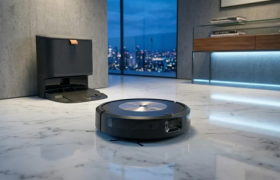
 Discover the top AI-powered robot vacuums of 2026. Read our expert comparison of the Roborock Saros and Roomba Max 705 Combo to find the best smart cleaner for your home.
 Mar 28, 2026
 Explore the complete Roomba Combo ecosystem, from the budget-friendly options to the premium Plus 505 Combo with advanced ClearView Pro LiDAR navigation. Discover real-world performance, pros, cons, and which hybrid robot vacuum is truly worth your investment.
 Mar 28, 2026
 Read our comprehensive Roborock S9 review. We analyze its massive 22,000 Pa suction power , dome-less 3D LiDAR navigation, and fully automated dock to see if it is the ultimate smart home cleaner.