Apple Vision Pro: The Ultimate Guide to the Future of Spatial Computing
Discover the revolutionary Apple Vision Pro. Explore deep insights on spatial computing, specs, visionOS, and how this device transforms productivity and entertainment forever.

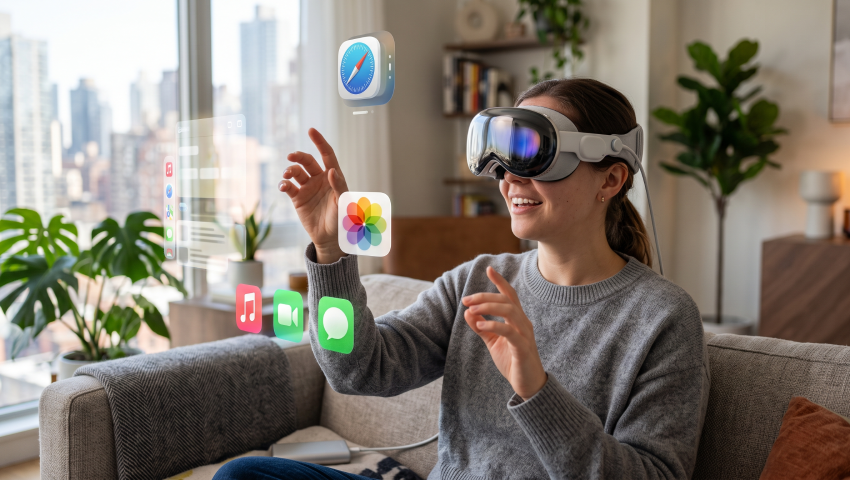
The Apple Vision Pro elevates image quality and eye-tracking to new heights, delivering an immersive experience that transforms how we perceive the real world.
Despite its significant drawbacks in terms of price and weight, and some issues with the initial release (such as occasional app crashes), it is undoubtedly one of the most revolutionary augmented reality/virtual reality devices ever made.
Industrial Design: A Symphony of Glass and Aluminum
The physical construction of the Apple Vision Pro reflects a design philosophy that prioritizes material science and sensory integration. Unlike the plastic chassis common in the virtual reality market, the Apple Vision Pro is dense with premium materials, designed to feel less like a peripheral and more like high-end eyewear.
The exterior is dominated by a singular piece of three-dimensionally formed laminated glass. This is not merely a cover; it is a sophisticated optical lens. The glass flows seamlessly into a custom aluminum alloy frame that curves gently around the user’s face. This choice of materials serves a dual purpose. Aesthetically, it aligns the device with the premium design language of high-end Apple hardware, echoing the curves of the iPhone and the finish of the Mac. Functionally, the glass acts as a transparent window for the massive array of cameras and sensors required to map the world, while the aluminum frame provides a rigid yet lightweight structure to act as a heat sink for the powerful onboard processing.
Comfort, however, is a complex equation when strapping a powerful computer to one’s face. The Apple Vision Pro weighs between 600 and 650 grams, a mass that is dense and front-heavy due to the glass and aluminum construction. To manage this, Apple introduced a modular system designed to tailor the fit to the individual user. The Light Seal, made of a soft, breathable textile, magnetically attaches to the frame. It comes in a wide variety of shapes and sizes, determined by a facial scan during the ordering process. This seal is critical not just for cushioning, but for creating a pitch-black environment for the displays by blocking out stray light that could break the immersion.
The retention system offers two distinct choices included in the box. The Solo Knit Band is a marvel of textile engineering—a single piece of 3D-knitted fabric that provides cushioning, breathability, and stretch. It features a “Fit Dial” that allows for precise micro-adjustments, ensuring the device sits securely against the face. While visually striking and easy to use, the Solo Knit Band places the entire weight of the device on the user’s cheeks and forehead. For longer sessions, users often turn to the Dual Loop Band, which introduces a top strap to distribute the weight more evenly across the crown of the head, significantly reducing facial pressure and neck strain.
The power source is another deviation from standard VR design. To keep the headset weight manageable, the battery is external. A smooth, machined aluminum battery pack connects to the headset via a woven braided cable that snaps into place with a satisfying twist-lock mechanism. This external battery provides approximately two hours of general use or two and a half hours of video playback. While the tether can occasionally snag on door handles or chair arms if one is not careful—a friction point noted by daily users—it is a necessary trade-off to remove the danger and heat of a lithium-ion battery from the user’s head.
The Visual Breakthrough: Micro-OLED and the End of Pixels
At the heart of the spatial experience is the display system. For decades, virtual reality has been plagued by the “screen door effect”—a visual artifact where the gaps between pixels are visible, creating a grid-like mesh over the image. The Apple Vision Pro obliterates this issue with the implementation of custom Micro-OLED technology.
The device packs a staggering 23 million pixels across its two displays. To visualize this density, imagine slicing a 4K TV into a square the size of a postage stamp. Each eye is presented with a resolution of approximately 3660 x 3200 pixels, offering a pixel pitch of just 7.5 microns. This is not an incremental improvement; it is a generational leap. When you look at text in the Apple Vision Pro—whether it is a webpage in Safari, a line of code in a terminal, or a caption in a movie—it appears razor-sharp. The jagged edges and aliasing common in other headsets are absent.
The color reproduction is equally impressive, covering 92% of the DCI-P3 color gamut. This ensures that movies and photos are rendered with cinema-grade color accuracy. The Micro-OLED panels are capable of true blacks, meaning that when you watch a movie in a darkened virtual theater, the surrounding darkness is absolute, devoid of the gray backlight bleed found in LCD-based headsets.
High dynamic range (HDR) support further enhances the realism. Specular highlights—like the glint of sunlight on a virtual car or the reflection of a lamp on a digital window—can shine with intense brightness while shadows remain deep and rich. To maintain visual fluidity, the displays support refresh rates of 90Hz, 96Hz, and 100Hz. Crucially, the system can playback 24fps and 30fps video content at native multiples, ensuring judder-free cinematic experiences that respect the original frame rate of the film.
Driving these displays are custom catadioptric lenses. These specialized three-element lenses are designed to maximize sharpness and clarity across the entire field of view, minimizing the blurring often seen at the edges of VR lenses. While the field of view is not the widest on the market—often compared to looking through a pair of binoculars or ski goggles—the trade-off is exceptional clarity within that view. Users with vision correction needs can magnetically attach ZEISS Optical Inserts, ensuring that the visual fidelity is not compromised by wearing glasses inside the headset.
Silicon Sorcery: The M2 and R1 Dual-Chip Architecture
The computational demands of spatial computing are immense. The device must render high-resolution 3D graphics for each eye while simultaneously processing a torrent of data from cameras, microphones, and sensors to track the user and the environment. To handle this bifurcated workload, Apple employs a unique dual-chip architecture.
1. The M2 Chip: The Powerhouse
The primary computational load is handled by the M2 chip, the same powerful silicon found in Apple’s laptops and iPad Pro. It features an 8-core CPU (4 performance cores and 4 efficiency cores) and a 10-core GPU. The M2 runs the visionOS operating system, executes applications, processes complex graphics, and manages the overall system logic. It provides the raw horsepower needed to run desktop-class applications and render high-fidelity visuals without stuttering. It essentially puts a fully capable Mac computer inside the headset.
2. The R1 Chip: The Speed of Sight
While the M2 handles the thinking, the R1 chip handles the sensing. This is a dedicated processor designed specifically for the unique latency challenges of spatial computing. Its sole responsibility is to process input from the 12 cameras, 5 sensors, and 6 microphones. The R1 streams new images to the displays within 12 milliseconds—eight times faster than the blink of an eye.
This ultra-low latency is the secret sauce that prevents motion sickness. In traditional VR, if there is a lag between when you turn your head and when the screen updates, your inner ear (vestibular system) and your eyes send conflicting signals to your brain, resulting in nausea. The R1 chip ensures that the digital world stays perfectly locked to the physical world. If you pin a virtual window to a wall and turn your head quickly, the window stays glued to that spot with zero perceptible drift or lag.
The R1 chip also utilizes high-bandwidth memory (LLW DRAM) from SK Hynix to handle the massive data throughput required for real-time video passthrough. This specialized memory allows the R1 to composites the video feed of the real world with digital overlays almost instantly, creating a “mixed reality” that feels continuous and real.
The comparison between the M2 chip and the R1 chip highlights their fundamentally different design priorities. The M2 is a general-purpose SoC optimized for a balance of CPU, GPU, and unified memory performance, making it ideal for running macOS applications, multitasking, and graphics-heavy workloads efficiently. Its architecture emphasizes raw performance per watt, using an 8-core CPU and 10-core GPU with unified memory to streamline general computing tasks.
The R1 chip, in contrast, is a highly specialized processor focused on sensor processing and latency reduction. It features a dedicated image signal processor designed to minimize photon-to-photon latency down to 12ms, which is critical for real-time imaging applications such as camera capture pipelines and AR/VR passthrough. Its memory bandwidth of 256GB/s ensures fast, deterministic handling of high-throughput sensor data.
In essence, the M2 is optimized for versatility and efficiency across general workloads, while the R1 is engineered for precision and real-time responsiveness in sensor-heavy tasks.
The Sensory Interface: Eyes, Hands, and Voice
The most revolutionary aspect of the Apple Vision Pro is likely its input model. Moving away from the abstract, button-laden controllers used by gaming headsets, Apple has bet on the most natural tools available: the user’s own body. The interaction paradigm is elegant in its simplicity: Look, Tap, Speak.
1. Eye Tracking: Telepathic Control
Inside the headset, a ring of invisible LEDs projects light patterns onto the user’s eyes, which are tracked by high-speed infrared cameras. This system determines exactly where the user is looking with pinpoint accuracy. In visionOS, the eyes act as the mouse cursor. Icons and buttons subtly animate or “swell” when you look at them, providing immediate visual feedback that the system knows your intent.
This creates a sensation often described as telepathic. You simply look at an app icon, and it highlights. You look at a search bar, and it activates. The system uses foveated rendering—a technique where the image is rendered at full resolution only where the user is looking, while the periphery is rendered at a lower quality. This mimics human biology and saves processing power without the user ever noticing.
2. Hand Gestures: The Digital Pinch
Once the eyes have selected a target, the hands execute the action. External cameras track the user’s hands in a wide field of view that extends down to the lap. There is no need to hold hands up in the air or point at the screen like a conductor.
- Select: Tap the thumb and index finger together. This is the equivalent of a mouse click.
- Scroll: Pinch and drag the hand up or down, or flick the wrist.
- Zoom: Pinch with both hands and pull them apart.
- Rotate: Pinch and rotate the hands in a circular motion.
Because the cameras look down and out, users can rest their hands comfortably on their thighs or a desk while navigating. This ergonomic consideration is crucial for long work sessions. The learning curve is minimal; the gesture is so small and subtle that it feels like a thought made manifest.
3. Voice and Optic ID
Siri is integrated deeply into visionOS, allowing users to open apps, dictate text, or control environments with voice commands. The six-microphone array uses directional beamforming to isolate the user’s voice from background noise.
Security is handled by Optic ID. Just as the iPhone uses Face ID, the Vision Pro analyzes the unique pattern of the user’s iris. This data is encrypted and stored in the Secure Enclave. Optic ID instantly unlocks the device when you put it on, authorizes Apple Pay purchases, and fills in passwords, ensuring that the device remains personal and secure.
VisionOS: Operating Within the Infinite Canvas
The hardware is impressive, but the software, visionOS, is what defines the user experience. Built on the foundations of macOS, iOS, and iPadOS, visionOS is the world’s first spatial operating system. It brings the familiar language of Apple software—icons, windows, transparency—into the third dimension.
1. Spatial Design Principles
The interface of visionOS is designed to feel physical. Windows are constructed from a translucent “glass” material that blurs the background. This frosted glass aesthetic allows the user to retain context of their surroundings—seeing if a person walks into the room—while maintaining legibility of the content. To convey depth and presence, these virtual windows cast realistic shadows on the floor or tables beneath them. As the time of day changes in the real world, the lighting on the virtual interfaces adjusts to match, grounding the digital objects in the physical environment.
The “Home View” is a familiar grid of circular icons, but it floats in mid-air. Unlike a computer monitor where space is finite, visionOS offers an Infinite Canvas. Users can spawn multiple apps and arrange them around their physical space in a 360-degree sphere. You can have a Safari window the size of a billboard in front of you, a Notes app floating to your right, and a Music player hovering above the kitchen counter. Spatial audio anchors the sound of each app to its location, so if you turn away from the Music player, the sound shifts to your ear, just as a physical radio would.
2. The App Ecosystem
At launch, the ecosystem was designed to be instantly robust by supporting two types of applications:
- Native visionOS Apps: These are built specifically for the spatial interface. They can use 3D objects, fully immersive environments, and the “Volumes” API which allows 3D content to exist within a bounded box. Examples include JigSpace, which lets users place a full-size Formula 1 car in their living room and disassemble it, or Encounter Dinosaurs, where a 3D reptile steps out of a portal and reacts to the user’s movements.
- Compatible Apps: Over a million iOS and iPadOS apps run on Vision Pro from day one. These appear as 2D windows but are fully functional. This ensures that users have immediate access to essential tools like Microsoft Word, Excel, streaming services, and utilities without waiting for developers to rewrite them.
Environments: The Psychology of Transport
One of the most praised and psychologically interesting features of visionOS is Environments. With a simple twist of the Digital Crown, users can dial out their physical reality and replace it with a high-fidelity 3D landscape. This is not simply a wallpaper; it is a full transport mechanism.
The available Environments are captured with extreme attention to detail and include locations like:
- Mount Hood: A serene lakeside view where rain gently ripples the water surface and the sound of precipitation surrounds you.
- White Sands: A desert landscape where the wind blows dust across the dunes and the sun shifts dynamically.
- Yosemite: A wintery valley floor, capturing the grandeur of the granite cliffs.
- The Moon: Standing on the lunar surface, looking back at Earth.
These environments are dynamic. If it is daytime in the real world, it is daytime in Yosemite. As the sun sets, the virtual environment transitions to dusk and then night. Users can choose to be fully immersed (blocking out the entire room) or partially immersed (where they still see their hands and desk, but the background is replaced).
Psychologically, Environments serve as a powerful “focus mode.” In an open-plan office or a cramped airplane seat, the visual noise can be distracting. By twisting the dial and transporting to Mount Hood, a user can create a serene, private mental space for deep work or relaxation. It turns a chaotic physical space into a sanctuary of concentration.
Redefining Productivity: The Ultimate Digital Workspace
The question often asked of new computing platforms is, “Can I actually work on this?” For the Apple Vision Pro, the answer for many professionals is a resounding yes, primarily due to its integration with the Mac.
1. Mac Virtual Display: The Killer Feature
The Mac Virtual Display is arguably the most critical productivity feature of the device. By simply looking at a MacBook while wearing the headset, a “Connect” button appears above the laptop. Clicking it turns the laptop’s physical screen black and projects a massive, crisp virtual display into the air above it.
This virtual screen can be resized to feel like a 27-inch monitor or a massive 100-inch projection, all while maintaining 4K clarity. Text is sharp enough for coding, reading fine print, and editing spreadsheets. Crucially, users can control this virtual Mac using the laptop’s physical keyboard and trackpad. This creates a powerful hybrid workflow: a user can have their main heavy-duty work (video editing in Final Cut Pro, coding in VS Code) on the virtual Mac display, while simultaneously surrounding themselves with native visionOS apps like Slack, Mail, and Music.
While the feature currently supports only one virtual Mac display officially (though it can be set to ultrawide resolutions), the ability to have a massive, private monitor anywhere—in a hotel room, a coffee shop, or a small apartment—is a game-changer for digital nomads and professionals.
2. Multitasking and Input
Multitasking in visionOS leverages human spatial memory. Instead of managing tabs or minimizing windows, users simply place apps in space. We naturally remember where we put things—the notes are on the left, the browser is in the center, the chat is on the right. This spatial organization reduces the cognitive load of switching contexts.
For input, the device features a floating virtual keyboard that users can peck at with their fingers. While functional for short searches or passwords, it lacks the tactile feedback required for touch typing. For any serious writing or work, a physical Bluetooth keyboard (like the Magic Keyboard) is essential. The Vision Pro tracks the physical keyboard and can even render a virtual preview of it, ensuring users can see their keys even when fully immersed in an Environment. Voice dictation is also highly accurate, serving as a viable alternative for drafting emails or messages.
3. The Coding Workflow
For developers, the Vision Pro offers a unique proposition. While Xcode does not run natively on the headset yet, the Mac Virtual Display allows developers to bring their full coding environment into the spatial realm. Users report that the ability to have a vertical monitor setup for code, flanked by documentation windows in Safari and a running preview of their app, creates an incredibly efficient “command center.” Terminal apps like LaTerminal run natively, allowing for direct SSH connections and server management from within the headset.
The Personal Cinema: Entertainment Revolutionized
If productivity is the brain of the Vision Pro, entertainment is its heart. The device creates a personal home theater that surpasses the quality of most physical televisions, offering an experience that is both private and grand.
1. The Cinema Environment
When watching movies in the Apple TV app, users can enable the Cinema Environment. This transforms the space into a virtual movie theater. Users can choose to sit in the “balcony” or “floor” seats. As the movie begins, the lights in the virtual theater dim, focusing all attention on the screen. The screen itself can be scaled to feel like it is 100 feet wide.
The visual quality of the Micro-OLED displays means that movies are presented with perfect blacks and vibrant colors. 3D movies, such as Avatar: The Way of Water, are a revelation. Unlike in a physical theater where 3D glasses reduce brightness and can introduce “crosstalk” (ghosting images), the Vision Pro sends a dedicated 4K image to each eye. The result is a 3D image that is brighter, sharper, and more immersive than anything possible in a cinema.
2. Apple Immersive Video
Apple has introduced a proprietary format called Apple Immersive Video. This is 180-degree, 3D video recorded at 8K resolution with Spatial Audio. It is designed to make the viewer feel physically present in the scene.
- Experience: In the series Adventure, viewers find themselves hanging off a cliff with a highliner in Norway, feeling a genuine sense of vertigo. In Alicia Keys: Rehearsal Room, the artist appears to be standing just a few feet away, making eye contact and performing intimately.
- Technical Marvel: The 180-degree format covers the user’s entire peripheral vision. Combined with the high resolution and stereoscopic depth, the brain is tricked into believing it is witnessing a real event. Users often report instinctively dodging objects or reaching out to touch the performers.
3. Spatial Photos and Panoramas
The emotional capability of the device shines in its handling of personal media. The iPhone 15 Pro and later models can capture “Spatial Video”—3D video viewable on the Vision Pro. Watching a video of a family gathering or a child’s first steps in 3D brings the memory to life with depth, making it feel as if one is looking through a window into the past rather than at a flat screen.
Perhaps even more impressive are Panoramas. Standard panoramic photos taken on an iPhone wrap around the user in the headset. Because the display resolution is so high, users can inspect details in a panorama shot years ago that they never noticed on a phone screen—the texture of the rock in a hiking photo, or the expression of a stranger in the background of a city shot. It transforms static images into immersive scenes, often moving users to tears as they “step back” into a cherished memory.
4. Gaming
Gaming on Vision Pro is a mixed bag. The device supports thousands of iPad games and a growing library of spatial games via Apple Arcade.
- Controller-Free Gaming: Games like Super Fruit Ninja allow users to slice fruit with their actual hands, a satisfying and intuitive experience. Synth Riders lets users catch notes to the beat of music.
- Limitations: The lack of physical motion controllers (like those on the Meta Quest) makes fast-paced, precision genres like first-person shooters difficult to play natively. However, users can pair a standard PlayStation or Xbox controller to play traditional 2D games on a massive virtual screen, making it an excellent portable console display.
Social Connection in the Age of Avatars
One of the biggest criticisms of VR headsets is that they are isolating. They put a wall between the user and the people around them. Apple has attempted to solve this with several ambitious technologies.
1. Personas: The Digital Self
Because the user’s face is covered by the headset, they cannot participate in video calls in a traditional manner. Apple’s solution is the Persona.
- Creation: Users scan their face using the headset’s outer cameras during setup. Machine learning algorithms then build a realistic 3D avatar of the user.
- Function: In FaceTime, Zoom, or Teams calls, this digital avatar mimics the user’s facial expressions, eye movements, and mouth shapes in real-time using the internal infrared cameras.
- Evolution: Early iterations were criticized for looking “uncanny” or “ghost-like,” but software updates have significantly improved the skin textures, lighting, and expressiveness. While still clearly digital, they have crossed the threshold into becoming a viable, if slightly surreal, tool for remote presence.
2. Spatial Personas: Hanging Out Virtually
A major evolution of this feature is Spatial Personas. Instead of confining the Persona to a floating 2D tile during a FaceTime call, this feature “cuts out” the avatar and places them in the user’s virtual room. This creates the feeling of hanging out in the same physical space.
Shared Experience: Through SharePlay, multiple users can gather as Spatial Personas to watch a movie together, sitting side-by-side virtually. They can collaborate on a Freeform whiteboard, pointing at items and brainstorming as if they were standing around a real table. The audio is spatial, so if your friend is sitting to your left, their voice comes from the left. This feature is often cited as the “killer app” for social connection, significantly reducing the feeling of distance between remote friends and family.
3. EyeSight: Breaking the Physical Barrier
To address the isolation of the person in the room with the user, Apple engineered EyeSight. An external lenticular OLED display on the front of the headset projects a digital view of the user’s eyes to the outside world.
- Transparency: When someone approaches the user, the passthrough feature activates, and the outer display clears to show the user’s eyes, signaling that they can see the other person.
- Context Cues: When the user is fully immersed in an app or environment, a shimmering light pattern appears on the outer display, signaling “Do Not Disturb” to those nearby.
- Reality: In practice, reviews note that the external display is dimmer and lower resolution than marketing images suggest, often making the eyes look somewhat difficult to see in bright light. However, the intent—to re-establish eye contact and human connection—is a significant step forward for headset design.
Enterprise and Specialized Applications
Beyond consumer entertainment, the Vision Pro is finding a significant foothold in high-stakes professional environments, where its price point is easily justified by its utility.
1. Medical and Surgical Innovation
The healthcare sector has been a rapid and enthusiastic adopter of the Vision Pro.
- Pre-Op Planning: Surgeons use apps to visualize 3D holograms of a patient’s anatomy—such as a heart, spine, or knee—before making an incision. They can rotate the model, inspect complex vascular structures, and plan their approach in 3D space.
- Sterile Control: In the operating room, surgeons can consult patient data, X-rays, and vitals on floating screens without touching non-sterile equipment. Eye tracking allows them to navigate data while their hands remain scrubbed and holding instruments.
- Success Stories: Institutions like Sharp HealthCare and Rothman Orthopaedics have documented successful surgeries aided by the Vision Pro, citing improved efficiency and visualization capabilities that traditional monitors cannot match.
2. Engineering and Industrial Digital Twins
In engineering, the concept of a “Digital Twin”—a virtual replica of a physical machine—is fully realized with spatial computing.
- KLM Royal Dutch Airlines: Technicians use the Engine Shop app to overlay step-by-step repair instructions onto physical aircraft engines. The headset highlights the exact bolt to turn or the specific cable to check, reducing errors and training time. It allows trainees to practice on expensive equipment without the risk of damaging it.
- Data Visualization: Apps like SAP Analytics Cloud allow enterprise managers to visualize complex data sets—such as global supply chains or logistics networks—as 3D maps on a boardroom table. This spatial view allows for collaborative decision-making and the identification of patterns that might be missed in 2D spreadsheets.
3. Architecture and Real Estate Visualization
Architects and real estate agents use the device to walk clients through buildings that do not yet exist.
FormaXR & Planner 5D: These apps allow users to stand on an empty lot and see the finished house around them at 1:1 scale. A client can walk through the virtual kitchen, check the sightlines from the living room, and even change the flooring or cabinets with a hand gesture. This spatial understanding is far superior to viewing 2D blueprints or renders on a screen, leading to faster approvals and fewer costly changes during construction.
4. Comparison: Vision Pro vs. Varjo XR-4
In the enterprise space, the Vision Pro competes with high-end headsets like the Varjo XR-4.
- Resolution: The Varjo XR-4 boasts even higher resolution in its central “bionic display” area, targeting extreme precision for automotive design and pilot training.
- Ecosystem: However, the Vision Pro offers a more versatile, standalone experience with a better user interface and deeper integration with the Apple ecosystem. While the Varjo is a tethered PC-VR powerhouse for niche industrial use, the Vision Pro is a general-purpose spatial computer that can handle medical imaging, office work, and communication with equal aplomb.
Accessibility: A New Frontier for Interaction
Apple has a long history of prioritizing accessibility, and the Vision Pro is arguably one of the most accessible computing devices ever created. For users with physical disabilities, it offers new ways to interact with the digital world.
1. Motor Accessibility and Dwell Control
For individuals with limited mobility (such as those with ALS or quadriplegia) who may not be able to use a mouse, keyboard, or even the standard pinch gestures, the Vision Pro offers transformative control schemes.
- Dwell Control: This feature allows users to select items simply by staring at them for a set duration. A user can navigate the entire operating system, type messages, and launch apps using only their eyes.
- Pointer Control: Users can use head movements or external eye-trackers to move a cursor.
- Voice Control: The entire OS can be navigated via voice commands, allowing for hands-free operation. Reddit users with motor impairments have described the device as a “game changer,” allowing them to use a computer independently in ways that were previously difficult or impossible.
2. Visual and Hearing Support
- VoiceOver: Apple’s screen reader is fully integrated into visionOS. It describes the spatial location of apps and reads text aloud, allowing blind or low-vision users to navigate the spatial interface.
- Zoom: Users can magnify the real world using the pass-through cameras. This acts as a powerful digital magnifying glass, allowing users with low vision to read signs, menus, or labels in the physical world.
- Hearing Aids: The device pairs directly with Made for iPhone hearing devices. It also provides visual captions for audio content and visual alerts for system sounds.
Travel Mode: Computing at 30,000 Feet
Using a VR headset on a moving vehicle is typically a recipe for disaster. The sensors detect the movement of the plane or car and interpret it as the user moving, causing the virtual windows to drift away or the interface to become unstable. Apple solved this engineering challenge with Travel Mode.
When the device detects the vibration and acceleration profile of an airplane, it prompts the user to enable Travel Mode. This feature disables the IMU-based acceleration tracking (which is confused by the plane’s movement) and relies entirely on visual sensors to lock windows to the inside of the cabin.
The result is transformative for frequent flyers. A user sitting in a cramped economy seat can put on the Vision Pro, enable the Mount Hood environment to block out the cabin, and open a massive movie screen to watch a film in peace. Alternatively, they can open their work windows and have a private, multi-monitor workspace that no one else can see. It turns “dead time” on a flight into a productive or relaxing experience, completely oblivious to the surroundings.
Conclusion: Living in the Future
The Apple Vision Pro is a complex triumph. It is arguably the most advanced piece of consumer electronics ever created, packing the power of a Mac, the sensors of a self-driving car, and the display of a high-end theater into a wearable form factor.
It is not without its first-generation quirks. The weight is substantial, the battery is tethered, and the price point places it firmly in the realm of early adopters and professionals. The “killer app” is not a single piece of software, but rather the cumulative effect of the ecosystem—the ability to work, watch, and connect in ways that feel magical.
However, the Vision Pro proves that the concept of spatial computing is viable. The technology works. The Micro-OLED displays dissolve the pixel grid. The eye-tracking feels telepathic. The integration with the Mac creates a genuine productivity workflow. By focusing on high-fidelity passthrough and seamless mixed reality, Apple has avoided the isolating trap of the “metaverse” and created a device that enhances the real world rather than replacing it.
As we look to the future, the technology will inevitably get lighter, cheaper, and smaller. Rumors of a “Vision Air” or future smart glasses suggest a roadmap where this technology becomes ubiquitous. But the foundation laid by the Vision Pro—the intuitive input of eyes and hands, the seamless blending of digital and physical, and the insistence on quality—will define how we interact with computers for decades to come. The era of spatial computing has not just been announced; it has begun.
The device delivers a premium mixed-reality experience thanks to its combination of high-resolution Micro-OLED displays and a flexible refresh rate ranging from 90Hz to 100Hz. Each eye benefits from roughly 23 million pixels (~3660 × 3200), producing razor-sharp visuals ideal for both AR and VR content.
Performance is anchored by a dual-processor system: the Apple M2 handles general computing and graphics with its 8-core CPU and 10-core GPU, while the Apple R1 manages sensor processing, keeping photon-to-photon latency at ~12ms—critical for smooth, immersive interactions.
The tracking suite is extensive, featuring 2 main cameras, 6 tracking cameras, 4 eye-tracking modules, TrueDepth, and LiDAR, which ensures precise motion and gaze tracking. Despite packing advanced optics and sensors, the headset remains reasonably light at ~600–650g, depending on the light seal and headband configuration.
Battery life supports ~2 hours of general use or 2.5 hours of video playback, while audio is powered by spatial sound with dynamic head tracking and ray tracing, adding realistic immersion. Storage options range from 256GB to 1TB, catering to a variety of content demands.
This combination of high-resolution visuals, low latency, and advanced tracking positions the headset as a top-tier choice for professional AR/VR users and developers seeking precision, comfort, and performance.