


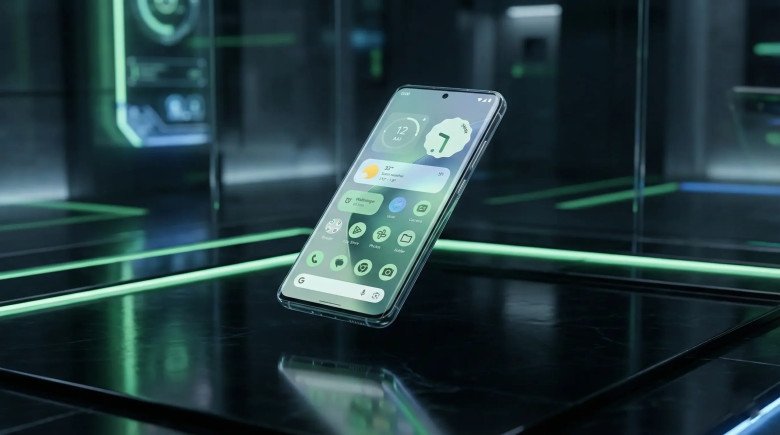
The history of mobile operating systems is often viewed as a linear progression of version numbers, each adding a layer of polish to the one before. However, occasionally, a release arrives that does not merely iterate but fundamentally restructures the rhythm of the ecosystem. Android 16, internally codified as "Baklava," represents precisely such a pivot. It serves as a demarcation line between the legacy cycle of annual, late-year updates and a new, accelerated future synchronized with the pulse of hardware innovation.
This report serves as an exhaustive, expert-level analysis of Android 16. It is designed for technology professionals, developers, and enthusiasts who demand a granular understanding of the operating system's architecture, interface design, and functional capabilities. We will dissect the strategic shift in release cadence, explore the depths of the "Material 3 Expressive" design language, and provide a technical breakdown of the platform's most ambitious feature: the integration of a full Linux terminal via the Android Virtualization Framework.
Furthermore, we will analyze the performance metrics of Android 16 compared to its predecessor, utilizing laboratory-grade benchmark data to understand the trade-offs between system efficiency and gaming performance. From the mandatory enforcement of edge-to-edge rendering for developers to the granular customization of icon shapes for end-users, this document leaves no stone unturned in the landscape of Android 16.
The "Baklava" Identity and the Alphabetical Legacy
Google’s tradition of assigning dessert-themed codenames to its Android releases is more than a whimsical internal quirk; it provides a historical anchor for the platform's development genealogy. Following the "Vanilla Ice Cream" of Android 15, the sixteenth major iteration adopts the moniker "Baklava." This choice is fitting not only for its alphabetical placement but for the metaphor it offers: a system built of distinct, delicate layers—kernel, virtualization, runtime, and interface—compressed into a dense, rich user experience.
Unlike previous versions where the codename was largely relegated to engineering commit logs, "Baklava" has permeated the technical discourse, symbolizing a release that is complex, multi-layered, and a departure from the "vanilla" standards of the past. It signals a move toward a richer, more customizable, and technically dense operating system.
The Strategic Realignment of Release Cadence
For over a decade, the Android ecosystem operated on a predictable but increasingly problematic schedule: major source code drops occurred in the third or fourth quarter of the calendar year. This timing frequently created a synchronization gap. New flagship hardware, often announced in the fall, would launch with software that was either weeks old or, in some cases, on the verge of being outdated by a pending OS update.
Android 16 shatters this paradigm. By shifting the stable release window to early June, the platform aligners itself with the manufacturing lead times of the year's most significant device launches. This strategic acceleration ensures that devices launching in the latter half of the year arrive with the latest API levels and feature sets out of the box, reducing the fragmentation that has historically plagued the Android landscape. This is not merely a scheduling adjustment; it is a declaration of maturity, prioritizing the integration of software and hardware supply chains over traditional software development lifecycles.
The Dual-SDK Philosophy
Coinciding with the timeline shift is the introduction of a "minor" SDK release strategy. In the past, developers had to wait a full year for new APIs. With the Android 16 cycle, the platform introduces a mid-cycle update (targeted for the fourth quarter) that injects new developer capabilities without breaking app compatibility. This dual-release model allows the operating system to iterate faster, responding to emerging technologies—such as advances in AI or new foldable form factors—without requiring a full "major" version number increment.
Visual Architecture: Material 3 Expressive
The visual identity of Android 16 is defined by Material 3 Expressive (M3E). While its predecessor, Material You, focused on personalization through color extraction, M3E shifts the focus toward vibrancy, motion, and structural non-conformity. It is an evolution that seeks to make the digital interface feel more organic and less like a static grid of information.
1. The Philosophy of Expression
The guidelines for Material 3 Expressive encourage a departure from the safety of muted pastels and uniform shapes. The design language pushes for "richer and nuanced colors," leveraging higher contrast ratios to create visual hierarchy. Where previous iterations might have used a single shape for all buttons or containers, M3E introduces the concept of "shape morphing" and the mixing of corner radii.
Designers are now encouraged to use diverse shapes to create "visual tension." A sharp-cornered container next to a fully rounded button is no longer a design error but a deliberate tactic to guide the user's eye. This editorial approach allows apps to break free from the homogeneous "stock Android" look, fostering interfaces that feel distinct and magazine-like while sharing a common underlying DNA.
2. Physics and Motion
A static interface is a dead interface. Android 16 overhauls the system's physics engine to impart a sense of mass and momentum to UI elements.
-
- The "Jiggly" Effect: In the Quick Settings panel, interacting with a tile creates a ripple effect that physically displaces neighboring tiles. This "jiggle" mimics the behavior of physical buttons on a rubber membrane, providing tactile visual feedback that confirms the input was registered.
- Bouncy Scrolling: The over-scroll animation has been retuned. Instead of a stiff stop or a simple stretch, lists now exhibit a "bounce" that implies the content has weight and inertia.
- Fluid Transitions: The transition between the Always-On Display (AOD) and the lock screen has been smoothed, with clock elements morphing seamlessly rather than fading in and out.
3. The Renaissance of Icon Customization
For years, the ability to change icon shapes was a beloved feature of the enthusiast community, often requiring third-party launchers. Android 16 restores this capability natively. Users can now apply custom geometries to their home screen icons, choosing from:
-
- Circle: The traditional standard.
- Squircle: A square with continuously rounded corners (superellipse).
- Rounded Hexagon: A six-sided polygon with softened edges.
- Scallop: A rounded shape with inverted corners.
- Tapered Rectangles: Various other geometric abstractions.
Crucially, this customization extends beyond the home screen to folder previews, ensuring a cohesive aesthetic across the primary interface layers. This return to customization signals Google's acknowledgement that Android's core differentiator remains its flexibility.
4. The Quick Settings Overhaul
The Quick Settings panel, a staple of the Android notification shade, receives its most significant structural redesign in recent memory. The update addresses the longstanding complaint of low information density.
-
- Resizeable Tiles: Users are no longer forced to use the large, pill-shaped toggles that dominated previous versions. Android 16 introduces a grid system that supports 1x1 "compact" tiles.
- Density: A single page can now host up to 16 compact tiles, allowing power users to toggle Wi-Fi, Bluetooth, Do Not Disturb, Flashlight, Wallet, and a dozen other settings without swiping to a second page.
- Visual Logic: These compact tiles strip away the text labels, relying on recognizable iconography. This presumes a level of user familiarity but vastly cleans up the visual noise of the panel.
The Desktop Convergence
The distinction between a mobile operating system and a desktop environment is rapidly eroding, and Android 16 is the excavator. Through a combination of user-facing features and deep architectural additions, this release positions high-end Android smartphones and tablets as legitimate convergence devices capable of replacing a traditional laptop for many workflows.
1. Desktop Windowing: True Multitasking
Previous attempts at "Desktop Mode" on Android were often hidden developer toggles or barebones implementations. Android 16 formalizes this with Desktop Windowing.
When connected to an external display (or running on a large-screen tablet), apps no longer simply stretch to fill the screen or lock into a rigid split-view. Instead, they inhabit free-form windows.
-
- Window Management: Each app window features a header bar with controls to minimize, maximize, and close—identical to the window decorations found on Windows, macOS, or Linux.
- Resizability: Users can drag the corners of any window to resize it arbitrarily. The OS dynamically handles the layout reflow, a capability powered by the mandatory "edge-to-edge" and adaptive layout policies enforced in API level 36.
- Snap and Tile: Windows can be snapped to the sides or corners of the screen, allowing for rapid workspace organization.
- Taskbar Overflow: The taskbar at the bottom of the screen has been enhanced with an "overflow" drawer, functioning as a Start Menu equivalent to launch apps without returning to the home screen.
2. Peripheral Integration
A desktop environment is defined by its input methods. Android 16 introduces granular controls for physical mice and keyboards.
-
- Cursor Customization: Users can now adjust pointer speed and acceleration curves.
- Universal Cursor: When using a dual-screen setup (tablet + monitor), the system intelligently manages the cursor transition between displays, respecting their relative physical positions and orientations.
- Keyboard Shortcuts: A robust set of global keyboard shortcuts (e.g., Meta+N for notifications, Alt+Tab for app switching) has been standardized, allowing for keyboard-centric navigation.
3. The Linux Terminal: Virtualization at the Core
Perhaps the most technically profound addition to Android 16 is the Linux Terminal. This is not an emulation layer or a containerized sandbox like Termux; it is a full implementation of the Android Virtualization Framework (AVF).
-
- Architecture: The terminal runs a full Debian-based Linux distribution in a protected Virtual Machine (VM). This VM sits alongside the Android OS, managed by a hypervisor (such as KVM on supported hardware).
- Hardware Acceleration: Unlike traditional software emulation, this VM has access to the device's GPU and other hardware accelerators. This allows for the execution of graphical Linux applications (GUI apps) with near-native performance.
- Developer Utility: A user can open the terminal, run
sudo apt update, installgit,vim, ornode.js, and spin up a local development server accessible via the Android Chrome browser. - Legacy Software: Demonstrations have shown the capability to run classic PC games (like Doom) and full desktop office suites within this environment, effectively placing a PC inside the smartphone.
Notifications: Intelligence and Utility
Android's notification system has long been considered the gold standard in mobile computing, yet it faces the perennial challenge of "notification spam." Android 16 addresses this through structural changes and AI integration.
1. Progress-Centric Notifications (Live Updates)
The static nature of standard notifications is ill-suited for real-time events. Android 16 introduces Progress-Centric Notifications (often consumer-branded as "Live Updates").
-
- The API: The
Notification.ProgressStyleclass allows developers to build notifications that track a linear journey using "segments" and "points." - Use Cases:
-
- Ridesharing: A bar visually representing the car's progress from pickup to drop-off.
- Food Delivery: Distinct segments for "Prep," "Pickup," and "Delivery."
- File Operations: A detailed progress bar for uploads or downloads.
-
- Visibility: These updates live prominently on the lock screen and at the top of the notification shade, updating in real-time without waking the screen or generating new alerts for every percentage change.
- The API: The
2. Notification Cooldown
To preserve user sanity, the Notification Cooldown feature acts as a dynamic gatekeeper.
-
- Mechanism: When an app or conversation sends a rapid burst of notifications (e.g., "Hello," "Are you there?", "Pick up"), the system detects the pattern.
- Response: The first notification rings at full volume. Subsequent notifications within a short window are progressively lowered in volume and haptic intensity.
- Result: The user is alerted to the activity but is not bombarded by a machine-gun stutter of vibrations.
3. AI Summarization and Organization
Leveraging on-device Generative AI, Android 16 transforms the notification shade into an intelligent digest.
-
- Summaries: When a long email or a dense chain of chat messages arrives, the OS generates a two-line summary (indicated by a sparkle icon). This allows the user to triage the importance of the message without opening the app.
- Organizer: The Notification Organizer automatically categorizes incoming alerts. "High Priority" items (messages from contacts, calendar events) remain at the top. "Low Priority" items (promotional emails, social media likes, news alerts) are bundled into a silent, collapsed "Updates" section, keeping the workspace clean.
Security, Privacy, and Safety
As our devices become repositories for identity, finance, and health data, the security perimeter must tighten. Android 16 introduces "defense-in-depth" mechanisms that assume the device might be physically stolen or compromised.
1. Identity Check and Theft Protection
The Identity Check feature addresses the "snatch-and-run" scenario where a thief takes an unlocked phone from a user's hands.
-
- Behavior: Even if the phone is unlocked, accessing sensitive areas—such as banking apps, password managers, or the ability to reset the Google account—now requires a fresh biometric authentication (fingerprint or face).
- Context Awareness: The system can be configured to enforce this strictness only when the device detects it is away from "Trusted Locations" like the user's home or office.
- Failed Authentication Lock: If the device registers five consecutive failed biometric attempts, it assumes a hostile actor and engages the Secure Lock Device state.
2. Secure Lock Device State
This new system state is a "hard lockdown." When triggered (either automatically by theft detection algorithms or remotely via "Find My Device"), the phone:
-
- Locks the screen immediately.
- Disables biometric unlock methods (which can be coerced).
- Hides all lock screen notifications to prevent 2FA code leakage.
- Requires the primary alphanumeric password or PIN to decrypt and unlock.
3. Privacy Sandbox and Screen Sharing
Android 16 continues the transition toward the Privacy Sandbox, replacing cross-app tracking identifiers with privacy-preserving APIs that allow for ad personalization without exposing user identity.
Additionally, Partial Screen Sharing is now the default behavior. When a user initiates a screen share in a video call, the system prompts them to share a single app window rather than the entire screen. This prevents the accidental broadcast of embarrassing notifications or sensitive data from other apps.
4. The Photo Picker Evolution
The System Photo Picker receives a major privacy upgrade. Instead of granting an app "Read External Storage" permission (which exposes all files), users can select specific photos to share with the app.
-
- Embedded Picker: New APIs allow developers to embed this system picker directly into their app's UI. To the user, it looks like part of the app; to the system, it is a secure sandbox.
- Cloud Search: The picker now integrates with cloud media providers. A user can search for "Beach 2024" within the picker, and it will query their Google Photos (or other supported cloud provider) library, downloading only the selected image to pass to the app.
Performance Engineering and Benchmarks
The "Baklava" update is not just about surface-level features; it involves significant re-engineering of the Android Runtime (ART) and kernel behaviors.
1. Generational Garbage Collection (CMC)
Memory management is often the silent killer of performance. Android 16 introduces Generational Concurrent Mark-Compact (CMC) Garbage Collection.
-
- Theory: In object-oriented programming, most objects die young (e.g., temporary variables used for a single calculation). "Old" objects (like the app's main window structure) persist.
- Implementation: The new GC separates the memory heap into "generations." It scans the "young" generation very frequently and the "old" generation rarely.
- Impact: This dramatically reduces the CPU cycles spent on memory management. The result is fewer dropped frames (jank) during complex UI animations and improved battery life, as the CPU can return to a low-power state faster.
2. 16KB Page Size Readiness
Most mobile devices historically used a 4KB memory page size. Android 16 lays the groundwork for the transition to 16KB pages.
-
- Why: Modern CPUs and high-bandwidth memory architectures operate more efficiently with larger data chunks.
- Benefit: A 16KB page size can improve the performance of memory-intensive applications—such as high-fidelity gaming, 4K video editing, and on-device AI inference—by up to 10-15%.
- Status: While not mandatory for all devices immediately, Android 16 includes developer tools to simulate this environment, signaling that future hardware (like the Pixel 10) will likely enforce it.
3. Benchmarking Analysis: Android 15 vs. Android 16
Early analysis conducted on Pixel hardware reveals the nuanced reality of a major OS update. The following data compares the final build of Android 15 against the stable release of Android 16.
Comparative Performance Metrics (Pixel 8a)
The Pixel 8a’s transition from Android 15 (“Vanilla Ice Cream”) to Android 16 (“Baklava”) delivers mixed results. Boot time improves slightly, starting in about 13.8 seconds thanks to optimized kernel initialization and more efficient ART loading. Battery life remains essentially unchanged at around 17 hours and 13 minutes, indicating that new background services do not add noticeable overhead. Thermal performance is stable, with only a minor average temperature increase from 25.9°C to 26.2°C.
Web browsing benefits from ART and WebView optimizations, producing faster page loads. However, Android 16 shows slight regressions in data throughput, dropping from 46.93 Mbps to 42.89 Mbps, and in gaming, with average FPS falling from 52 to 48 due to a less mature graphics stack and occasional frame dips.
Overall, Android 16 offers modest improvements in responsiveness and web performance while maintaining battery and thermal stability, though some network and gaming performance issues may require future driver updates.
Insight: The data suggests that Android 16 is a highly efficient OS for general computing, offering equal battery life and faster UI/Web performance. The regression in gaming highlights the complexity of the graphics stack transition, which typically resolves as GPU drivers mature over the months following release.
The Developer Ecosystem: API Level 36
For developers, Android 16 (API Level 36) brings a mix of powerful new tools and strict new mandates.
1. The End of Black Bars: Edge-to-Edge Enforcement
One of the most significant changes is the mandatory enforcement of edge-to-edge rendering.
-
- Legacy Behavior: Previously, apps could choose to place their content between the status bar and the navigation bar, leaving black or solid-colored bars at the top and bottom of the screen.
- New Mandate: Apps targeting Android 16 must draw behind the system bars. The
windowOptOutEdgeToEdgeEnforcementattribute is deprecated and ignored. - Implication: Developers must update their layouts to handle "insets" (safe areas) to ensure buttons or text are not obscured by the camera cutout or the gesture navigation handle. This forces the entire app ecosystem to adopt a modern, immersive look.
2. Predictive Back Enforcement
The "Predictive Back" gesture, which visually peels back the current screen to reveal the destination before the user completes the swipe, is now enforced.
-
- Requirement: Apps must use the
OnBackInvokedCallbackAPI. The legacyonBackPressed()method is effectively obsolete for this behavior. - User Experience: This eliminates the "navigation roulette" users often face, where they are unsure if a back gesture will close a menu, exit the app, or return to a previous page.
- Requirement: Apps must use the
3. Health Connect and FHIR
Android 16 positions the smartphone as a central node in the user's healthcare network.
-
- FHIR Support: The Health Connect API now supports the Fast Healthcare Interoperability Resources (FHIR) standard.
- Capability: Apps can now read and write complex medical records—such as vaccination history, lab results, and prescription details—in a format interoperable with hospitals and medical providers, all secured by granular user permissions.
Manufacturer Implementations
While Google provides the foundation, manufacturers build the skyscrapers. The adoption of Android 16 varies by brand.
1. Samsung One UI 8
Samsung remains the most significant partner in the Android ecosystem. Its implementation, One UI 8, debuted shortly after the Android 16 stable release.
-
- Integration: One UI 8 merges the "Material 3 Expressive" fluid physics with Samsung's own design language.
- Unique Features:
-
- Now Bar: A specialized edge panel for "Live Updates" widgets.
- DeX Integration: Samsung aligns its DeX desktop mode with Android 16's native desktop windowing, allowing for seamless drag-and-drop between the tablet interface and the windowed environment.
- Galaxy AI: Features like "Portrait Studio" (stylizing pet photos) are deeply integrated into the OS layer.
-
- Rollout: The update launched first on the Galaxy Z Fold 7 and Flip 7, followed rapidly by the Galaxy S25 and S24 series.
2. Xiaomi HyperOS and OnePlus OxygenOS
-
- Xiaomi: The update to HyperOS leverages Android 16's kernel improvements to enhance the "Human x Car x Home" ecosystem, improving the latency of connections between the phone and Xiaomi's EV (Electric Vehicle) line.
- OnePlus: OxygenOS 16 focuses on the "Fluid Cloud" (their take on Live Updates) and utilizes the new Auracast capabilities to allow users to broadcast audio to multiple pairs of OnePlus Buds simultaneously.
Connectivity and Accessibility
1. Audio Share (Auracast)
Android 16 brings native support for Auracast broadcast audio.
-
- Function: A user can turn their phone into a silent transmitter. Anyone nearby with Auracast-compatible headphones can tune into the stream.
- Use Cases: Silent discos, shared movie watching on a train, or assistive listening in public venues (like airports) that broadcast announcements directly to hearing aids.
2. Accessibility for Hearing and Vision
-
- Ambient Volume Control: Users with supported hearing aids can now control the microphone gain of their hearing devices directly from the Android volume panel, effectively using the phone as a remote control for their ears.
- Outline Text: To assist users with low vision, a new global setting applies a high-contrast outline to all text elements. Unlike previous "experimental" high-contrast modes, this is fully supported across all apps and renders cleanly even on complex, moving backgrounds.
The QPR Updates: The Evolution Continues
Android 16 is a living platform. Following the initial launch, the Quarterly Platform Releases (QPR) continued to refine the experience.
✅ QPR2 Features
The second quarterly update (QPR2) introduced several "hidden" but vital features:
-
- Screen-Off Unlock: Users can now authenticate via fingerprint without waking the screen first, streamlining the unlock process.
- Sideloading UI: A redesigned package installer provides clearer, scarier warnings when installing apps from unknown sources, while also using a "squiggly" progress bar to indicate activity.
- Notification Organizer: The AI-based sorting of low-priority notifications was fully enabled in this release.
- Cursor Customization: The robust mouse settings (acceleration, speed) for Desktop Mode were finalized and exposed to users in this update.
Conclusion
Android 16 "Baklava" is a testament to the platform's maturation. It is no longer just a smartphone OS; it is a convergence point for desktop computing (via Linux/Desktop Mode), a medical record keeper (via Health Connect), and a personalized digital expression (via Material 3 Expressive).
By breaking the release cycle tradition, Google has proven it can move at the speed of hardware. While the transition brings challenges—notably in gaming optimization and the strict new demands on developers—the result is an operating system that is faster, safer, and infinitely more capable than its predecessors. Whether you are a developer refactoring for edge-to-edge layouts or a user simply enjoying the jiggly physics of the new Quick Settings, Android 16 represents the sweetest layer of the Android stack to date.
✅ Appendix: Android 16 Device Eligibility (Key Models)
Google Pixel
-
- Pixel 6, 6 Pro, 6a
- Pixel 7, 7 Pro, 7a
- Pixel 8, 8 Pro, 8a
- Pixel 9, 9 Pro, 9 Pro XL, 9 Pro Fold
- Pixel Fold, Pixel Tablet
Samsung Galaxy
-
- Galaxy S25, S25+, S25 Ultra
- Galaxy S24, S24+, S24 Ultra, S24 FE
- Galaxy S23, S23+, S23 Ultra, S23 FE
- Galaxy S22, S22+, S22 Ultra
- Galaxy Z Fold 7, Flip 7 (Launch Devices)
- Galaxy Z Fold 4/5/6, Z Flip 4/5/6
- Galaxy Tab S8/S9/S10 Series
OnePlus
-
- OnePlus 13, 13R
- OnePlus 12, 12R
- OnePlus 11, 11R
- OnePlus Open
- OnePlus Nord 4, CE4
Xiaomi
You may also like
-

How to Optimize Your Website for Google SGE & Win AI Search
-
The Engineering Secrets Behind Ancient Megastructures
-
OpenAI Sora vs Midjourney v6: Best AI Tools for Marketers
-
Midjourney v6: The Complete Guide to Advanced Prompts & Photorealism
-
The Rise and Fall of OpenAI Sora: What Happened to the Video AI Giant?
-
Apple Watch Series 11 Review: Is It Worth the Upgrade?




















Comments
0 comment